Introduction:
Theory is only as good as its implementation. You can have the best risk management policy in the world, but if your firewalls are misconfigured or your servers are running default passwords, the strategy collapses.
This section moved beyond “what” we need to protect and focused intensely on “how” we actually harden the infrastructure against real-world attacks.
From securing network architectures to locking down Active Directory and navigating the complexities of cloud security, here is a breakdown of the critical skills I acquired and how they are reshaping my approach to engineering.
1. Secure Network Architecture
Before touching a single command line, I had to rethink how networks are built. The old model of a “trusted internal network” is dead.
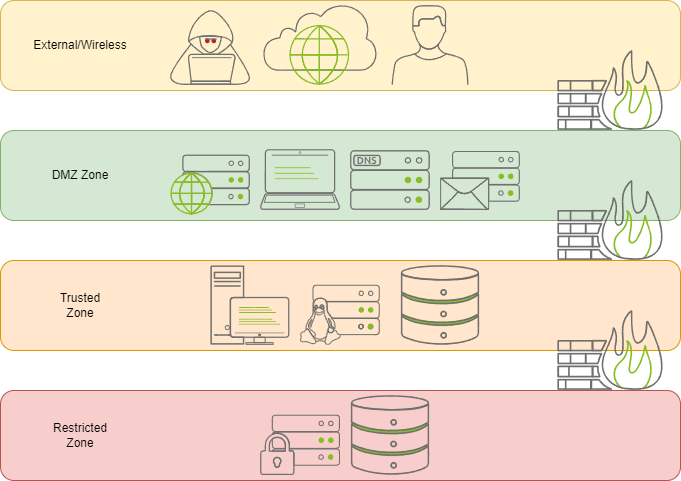
Key Takeaways:
- Segmentation is King: I learned that flat networks are a nightmare for security. By segmenting networks (VLANs, subnets), we limit lateral movement. If an attacker compromises a printer, they shouldn’t be able to pivot to the database server.
- DMZs and Choke Points: Understanding how to place public-facing services in a Demilitarized Zone (DMZ) and funneling all traffic through controlled choke points (firewalls, proxies) is essential for minimizing exposure.
- Zero Trust in Architecture: The architecture itself must enforce “never trust, always verify.” This means micro-segmentation and strict access controls at every hop, not just at the perimeter.
2. Linux and Windows Hardening
Operating systems are the foundation of almost every service we run. If the OS is weak, everything on top of it is vulnerable.
Linux System Hardening:
- Least Privilege: Moving away from root usage and implementing strict
sudopolicies. - Service Minimization: Disabling unused services (SSH if not needed, unnecessary daemons) to reduce the number of entry points.
- File Permissions: Understanding the nuances of
chmod,chown, and ACLs to ensure sensitive files (like/etc/shadow) are inaccessible to unauthorized users. - Kernel Parameters: Tweaking sysctl settings to prevent IP spoofing and other network-level attacks.
Microsoft Windows & Active Directory Hardening:
- The AD Danger Zone: Active Directory is the crown jewel of many enterprises, and therefore the primary target. I learned how to secure Domain Controllers, enforce strong password policies, and manage Group Policy Objects (GPOs) effectively.
- Disabling Legacy Protocols: Turning off SMBv1, NTLMv1, and other outdated protocols that are ripe for exploitation.
- User Account Control (UAC): Ensuring UAC is enabled to prevent unauthorized elevation of privileges.
- Audit Policies: Configuring Windows to log critical events (logons, privilege changes) so we can detect anomalies.
3. Network Devices and Protocols
It’s not just about servers; the devices that connect them are equally critical. A misconfigured router or switch can bypass all other security measures.
Network Device Hardening:
- Management Plane Security: Disabling Telnet and HTTP in favor of SSH and HTTPS. Changing default credentials is the bare minimum; using AAA (Authentication, Authorization, Accounting) with TACACS+ or RADIUS is the goal.
- Port Security: Preventing unauthorized devices from connecting to switch ports.
- Firmware Updates: Keeping device firmware up to date to patch known vulnerabilities.
Network Security Protocols:
- Encryption in Transit: Understanding the difference between SSL, TLS 1.2, and TLS 1.3.
- Secure Authentication: Moving away from cleartext protocols (FTP, Telnet) to secure alternatives (SFTP, SSH).
- IPSec and VPNs: How to establish secure tunnels for remote access and site-to-site connectivity.
4. Virtualization, Containers, and Cloud
The modern infrastructure is rarely physical. It’s virtual, containerized, and often in the cloud.
Virtualization and Containers:
- Hypervisor Security: Ensuring the hypervisor itself is hardened to prevent VM escape attacks.
- Container Isolation: Understanding that containers share the host kernel. If the kernel is compromised, all containers are at risk.
- Image Scanning: The importance of scanning container images for vulnerabilities before deployment.
Intro to Cloud Security:
- Shared Responsibility Model: In the cloud, the provider secures the cloud (hardware, physical), but I am responsible for security in the cloud (configurations, data, identities).
- Cloud-Native Tools: Getting familiar with native security tools like AWS Security Hub, Azure Security Center, and CloudTrail for logging.
- Misconfiguration Risks: Most cloud breaches aren’t due to hacking, but due to simple misconfigurations.
5. Auditing and Monitoring
You can’t defend what you can’t see. The final piece of the puzzle is how to detect intrusions and verify compliance.
Auditing and Monitoring:
- SIEM Fundamentals: How to aggregate logs from different sources (firewalls, servers, AD) into a Security Information and Event Management (SIEM) system.
- Log Analysis: Learning to read logs not just for errors, but for signs of malicious activity (failed login attempts, unusual outbound traffic).
- Compliance Auditing: Using automated tools to check if systems adhere to security baselines.
- Incident Detection: Setting up alerts for specific indicators of compromise (IOCs) to trigger immediate investigation.
Conclusion:
I no longer just talk about “hardening”; I know exactly which commands to run, which policies to configure, and which protocols to disable.
This section taught me that security engineering is a continuous cycle:
- Design a secure architecture.
- Harden the systems and devices.
- Monitor for deviations.
- Audit to ensure compliance.
- Repeat.
The transition from “knowing” to “doing” is the most valuable part. Whether it’s securing a Linux server, locking down an Active Directory forest, or configuring a cloud bucket, the principles remain the same: minimize the attack surface, enforce least privilege, and watch everything.